Ever feel like you're writing into the void? You spend hours crafting what you think is a killer piece of content, only for it to gather digital dust. It’s a common frustration, but it’s fixable. So, how do you actually write SEO-optimized content that people and search engines love?
It all comes down to a strategic blend of understanding what people are actually looking for, creating genuinely helpful material, and then structuring it in a way that makes search engines sit up and take notice. When you get this right, your content transforms from a forgotten file into a powerful asset that consistently draws in the right audience.
Why SEO Content Is Your Greatest Asset
With billions of searches happening every day, getting seen isn't a given—it's earned. Publishing content without a solid SEO strategy is like whispering in a hurricane; your message is just going to get lost. The real goal is to create something that satisfies both curious readers and demanding search engine algorithms. It’s a balancing act, and it requires a methodical approach.
And no, effective SEO content isn't about mindlessly stuffing keywords onto a page. It's about building a digital experience that answers questions, solves real problems, and establishes your authority.
To make this happen, your workflow needs to integrate a few core pillars:
- Audience Understanding: Getting to the bottom of what your audience is searching for and, more importantly, why.
- Helpful Content: Crafting material that delivers real value and completely satisfies the searcher's needs.
- Technical Structure: Organizing your content with clear headings, optimized meta tags, and smart internal links that guide both users and search engine crawlers.
When you nail this process, your content becomes a magnet for organic traffic. Think about it: Google now handles over 16.4 billion searches every single day. The top organic result alone snags a massive 39.8% click-through rate (CTR), which proves that ranking high is the lifeblood of visibility. You can dig into more of these numbers in Backlinko's latest SEO statistics.
This whole process can be broken down into a simple, powerful flow that moves from intent to content to structure.
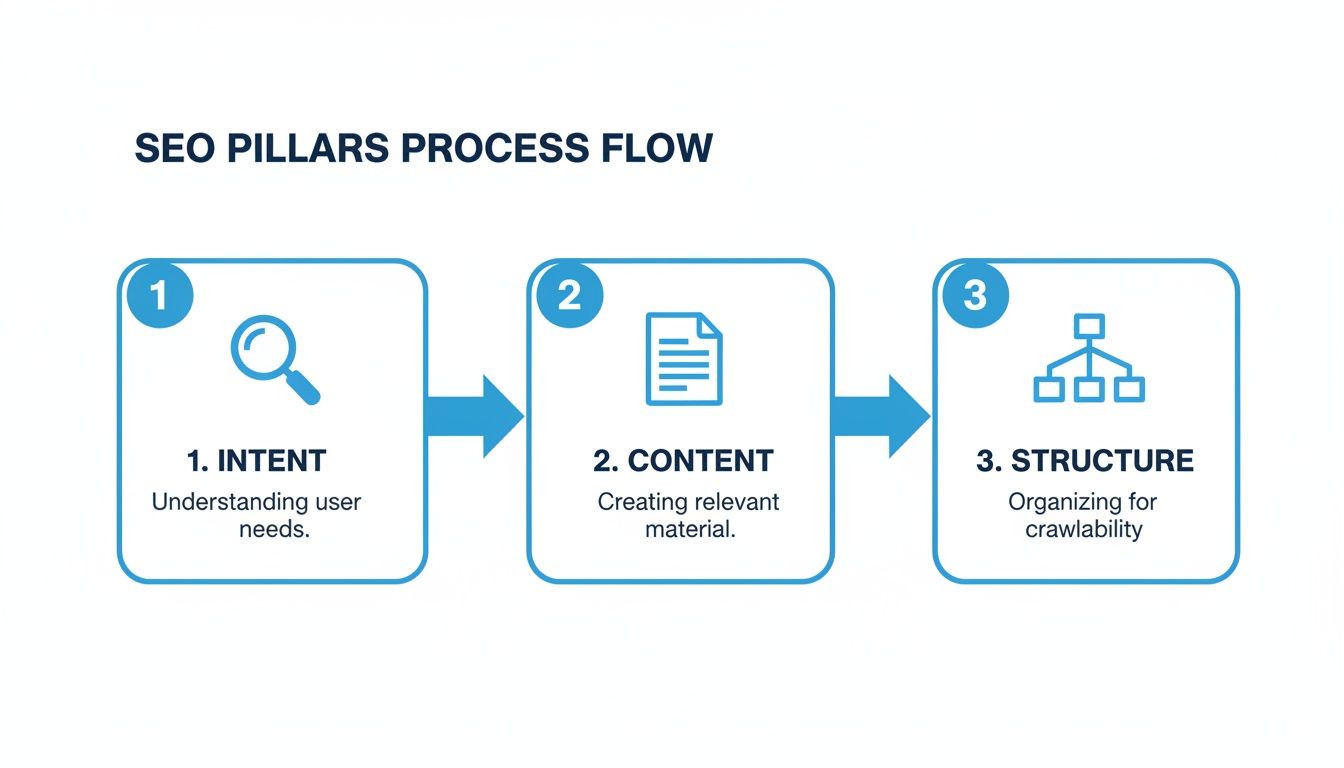
As you can see, real success starts with understanding user intent before a single word is written.
The core idea is simple: if you create the single best resource on the internet for a specific query, Google has no choice but to rank you. It requires a commitment to quality that goes beyond basic optimization tricks.
To help you get there faster, this guide breaks down the entire process. Here's a quick look at the key pillars we'll be covering.
The Core Pillars of SEO Content Creation
| Pillar | Objective | Key Action |
|---|---|---|
| Keyword Research | Identify high-value topics that align with user intent and business goals. | Use tools to find relevant keywords and analyze their search volume, difficulty, and intent. |
| Content Planning | Structure the article logically to answer the user's primary and secondary questions. | Create a detailed outline with H1, H2s, and H3s based on competitor analysis and SERP features. |
| Writing & Optimization | Craft high-quality, helpful content that incorporates keywords naturally. | Write engaging copy, optimize on-page elements, and include semantic keywords. |
| Performance Tracking | Measure the impact of your content and identify areas for improvement. | Monitor rankings, traffic, and engagement metrics using analytics tools. |
These pillars form a repeatable workflow for creating content that not only ranks but also delivers real value to your audience. Modern tools, like AI assistants, can make this entire process more efficient, helping you move from initial research to a polished draft in a fraction of the time.
Finding Keywords That Drive Real Traffic
Great SEO starts long before you write a single word. It begins with getting inside your audience's head and understanding the 'why' behind their search. Chasing high-volume keywords without grasping what the user actually wants is a classic recipe for content that gets clicks but no real engagement. The real goal is to find the exact phrases your audience is using to solve their problems.
Think of every search as a question, even when it’s not phrased like one. Someone typing “best coffee tables for small spaces” is asking for product recommendations, not a history of furniture design. That’s the difference between writing at your audience and writing for them.
Decode the Four Types of Search Intent
To create content that truly connects, you have to become a detective of intent. Just about every search query falls into one of four buckets, and each one demands a completely different type of content. Getting this right is probably the most critical step in the whole process.
- Informational Intent: The user wants to learn something. Keywords are often questions like "how to," "what is," or "guide." For example, "how tall are coffee tables."
- Navigational Intent: The user is just trying to get to a specific website. They might search for "Pulsaro AI download" instead of typing the URL. Easy enough.
- Commercial Intent: The user is in research mode, weighing their options before a potential purchase. Think "Pulsaro vs ChatGPT" or "best AI command center for Mac."
- Transactional Intent: The user is ready to pull the trigger and buy something. These searches often include words like "buy," "discount," or "free trial."
Understanding this framework is your secret weapon. It helps you align your content perfectly with what a user needs in that moment. If their intent is commercial, a detailed comparison post will always outperform a simple how-to guide.
Uncover Long-Tail Keywords and Topic Clusters
While those big, high-volume keywords look tempting, the real gold is often in the long-tail keywords. These are longer, more specific phrases that have lower search volume but much higher conversion rates. Think about it: ranking for a broad term like "AI" is next to impossible. But "AI content creation tools for mac"? That's a super-specific query from someone who knows exactly what they want.
These specific queries are valuable because they reveal precise user pain points.
This is where you can start building real topical authority. Instead of just writing one-off articles, you create a whole cluster of interconnected content that covers a subject from every conceivable angle. You'll have one main "pillar" post that targets the broad keyword, with smaller "cluster" posts targeting related long-tail keywords. Crucially, they all link back to the pillar.
By thoroughly covering a topic, you're sending a powerful signal to Google that your site is a comprehensive, authoritative resource. This doesn't just help individual pages rank; it lifts the performance of your entire website over time.
For example, a pillar page on "automatic content creation" could be supported by cluster posts on "AI blog post outlines," "using AI for SEO research," and "fact-checking AI-generated content." Each piece makes the others stronger. If you want to dive deeper into this strategy, our guide on automatic content creation is a great place to start.
Build Your Keyword List with AI
Brainstorming keywords by hand is slow and, frankly, pretty limiting. AI tools can put this process on hyperdrive, helping you uncover angles and ideas you would’ve completely missed. Inside Pulsaro, for instance, you can use different AI models for very specific research tasks.
Just look at a typical search engine results page (SERP). Google serves up different content formats—shopping ads, featured snippets, organic results—all based on what it thinks the user wants.
This shows that Google isn't just ranking ten blue links anymore. It's providing a rich mix of results tailored to user intent. Your job is to create the content that best fits one of those spots.
Here are a couple of ways you can use AI to speed things up:
- Use Perplexity for Deep Research: Ask it something like, "What are the most common challenges SEO writers face when researching keywords?" You'll get a list of pain points you can instantly turn into informational content ideas.
- Leverage Claude for Brainstorming: Give it a prompt like, "Generate a topic cluster around the keyword 'how to write seo optimized content' for a blog targeting startup founders."
This AI-assisted workflow helps you build a robust content map that speaks to your audience at every stage of their journey. You'll stop chasing a few popular terms and start strategically owning entire conversations.
Structuring Content for Scanners and Spiders
You can write the most brilliant article in the world, but if it’s structured like a dense academic paper, it’s going to fail. It’s a hard truth. Today’s readers are scanners, and search engine crawlers (spiders) are even more impatient. They need a clear roadmap to understand what your content is about and why it matters.
This is where a logical structure, built with headings and smart formatting, becomes your greatest ally.
A solid structure does two things at once: it helps users find answers quickly, and it signals the information hierarchy to Google. Think of your main title (the H1) as the book’s title and your subheadings (H2s, H3s) as the chapter and section titles. Each one gives a clue about the content that follows.
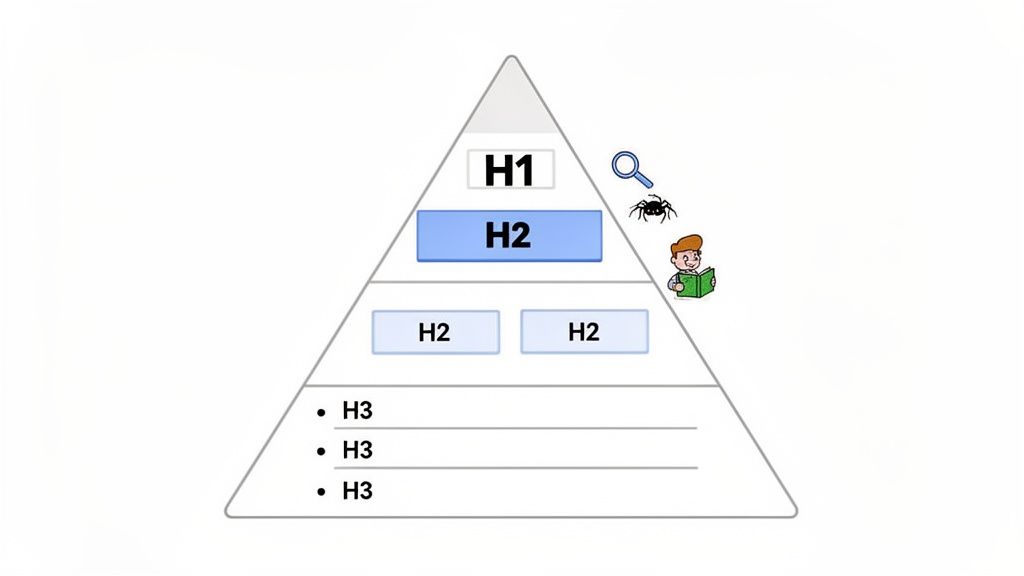
This hierarchical approach isn’t just for looks; it’s fundamental to how search engines determine relevance.
Build a Logical Information Hierarchy
Your outline is the blueprint for your article's success. It ensures you cover a topic comprehensively while making the content digestible for someone just skimming for answers. Proper use of heading tags here is completely non-negotiable.
- H1 Tag: Your main title. Use it only once. It needs to contain your primary keyword and nail the article's core topic.
- H2 Tags: These are your main subheadings, breaking the article into logical, high-level sections. They should almost always include primary or secondary keywords.
- H3 Tags: Use these to drill down into the topics within your H2 sections. They’re perfect for lists, steps, or more detailed points.
This nested structure makes it dead simple for a spider to crawl your page and for a human to scan it. When a user can glance at your headings and know exactly where to find their answer, they’re far more likely to stick around.
Master the Inverted Pyramid Model
Journalists have been using the inverted pyramid for decades because it just plain works. The concept is simple: deliver the most critical information first, follow up with supporting details, and finish with general background context.
In SEO content, this means you answer the user’s main question right at the beginning—often in the first couple of paragraphs. Don't bury the lead. This approach respects the reader’s time and can dramatically improve engagement metrics like time on page.
Getting straight to the point is also a huge factor in winning featured snippets. Google often pulls answers for these "position zero" results directly from the concise, upfront information in an article.
This model is more critical than ever. While organic search drives 53% of all website traffic, user behavior is changing. The rise of AI-powered summaries means that 58% of searches now end without any clicks. By providing immediate value, you stand a much better chance of capturing the user's attention before they bounce. You can learn more about how AI is reshaping search trends in these 2025 statistics.
Write Headlines That Spark Curiosity
Your H1 title is your first—and often only—chance to make an impression on the search results page. A great headline has to strike a delicate balance.
It needs to be:
- Keyword-Optimized: Include your primary target keyword, preferably near the beginning.
- Benefit-Driven: Clearly communicate the value the reader will get. What problem are you solving for them?
- Intriguing: Use numbers, questions, or powerful adjectives to make it pop.
For instance, a title like "Guide to SEO Content" is technically correct but incredibly boring. A much better version would be something like, "How to Write SEO Optimized Content That Truly Ranks in 2025." It’s got the keyword, promises a clear benefit (ranking), and adds a touch of timeliness.
This same principle applies right down to your H2 and H3 subheadings. Use them to create a narrative flow and keep the reader scrolling. Instead of a generic "Conclusion," try something more descriptive like "Putting It All Together for Higher Rankings." Every heading is an opportunity to re-engage your reader and reinforce your topic's relevance.
Writing Content That Google Trusts
Simply having well-structured content isn't going to cut it anymore. If you want to stand out, your writing has to earn the trust of both your readers and Google. This is where E-E-A-T enters the picture.
It stands for Experience, Expertise, Authoritativeness, and Trustworthiness, and it's the framework Google uses to figure out what content is high-quality and genuinely helpful.
Think about it like this: if you need financial advice, you're going to listen to a certified financial planner, not some anonymous blogger. Google is doing the same thing, just on a massive scale. It wants to show users content from sources who prove they know their stuff because they've actually lived it.
Demonstrate Firsthand Experience
The first "E" for Experience is a newer, and frankly, critical addition. Google wants to see proof that you have real-world, firsthand experience with whatever you're writing about. This is your single best defense against all the generic, AI-generated fluff that just rehashes what everyone else is saying.
Here's how to bake genuine experience into your writing:
- Share Unique Insights: Don't just list a product's features. Talk about how one of those features solved a very specific problem for you. Describe the quirky workaround you figured out or the common mistake you made so others don't have to.
- Use Original Visuals: Ditch the stock photos. Instead, use your own screenshots, photos of a product you're actually holding, or even short video clips of you walking through a process. It's tangible proof you've been there.
- Tell Personal Stories: Weave in phrases like "In my experience..." or "When I tested this..." to frame your advice. A short, relevant anecdote connects with a reader far better than a dry list of tips ever could.
This focus on personal experience is a huge part of modern SEO. AI assistants like those in Pulsaro are amazing for getting a draft started or digging up research, but the unique insights that signal true experience? That has to come from you.
Your personal experience is the one thing your competitors can't replicate. It’s what transforms a good article into a great one and builds a direct connection with your reader, showing them you've been in their shoes.
By grounding your advice in real-world application, you create content that's not only more helpful but also a lot harder for anyone else to copy. This is a core part of great writing, which we cover in our guide to content creation best practices.
Build Authority and Trust
The rest of the framework—Expertise, Authoritativeness, and Trust—is all about proving your credentials and backing up your claims. You build this over time, but you can signal it in every single piece of content you create. It’s not just about what you say, but how you prove it.
This becomes especially important for topics that could impact someone's health, finances, or safety. Google calls this "Your Money or Your Life" (YMYL) content, and for these subjects, the E-E-A-T standards are sky-high.
Establish Credibility with Sources and Bios
You can build trust right on the page with just a few key elements:
- Cite Your Sources: If you're dropping a statistic or quoting a study, link out to the original source. Linking to authoritative places like academic journals, government sites, or well-known industry reports shows you've done your homework.
- Use Clear Author Bios: Every article needs a clear byline with a short bio. Who wrote this? Why are they qualified to talk about it? Link out to their social profiles or personal site to help establish their identity and expertise.
- Be Transparent: Are you reviewing a product you got for free? Are there affiliate links on the page? Disclose it. Honesty builds trust faster than anything else.
Putting these tactics to work shows that your content is reliable and well-researched. It sends strong positive signals to readers and search engines alike, making it clear that you're not just publishing another article, but creating a trustworthy resource from a credible expert.
Polishing Your On-Page SEO Checklist
Alright, you've got a solid draft packed with expertise and value. Now it's time for the final polish. Think of this next part as detailing a car before a big show—it’s all about the small touches that make a huge difference. These technical on-page SEO elements are the signposts that tell Google exactly what your content is about and why it deserves to rank.
This isn't just busywork. It's a final quality check that ensures every piece of your article, from the title people see on Google to the hidden text on your images, is pulling its weight.
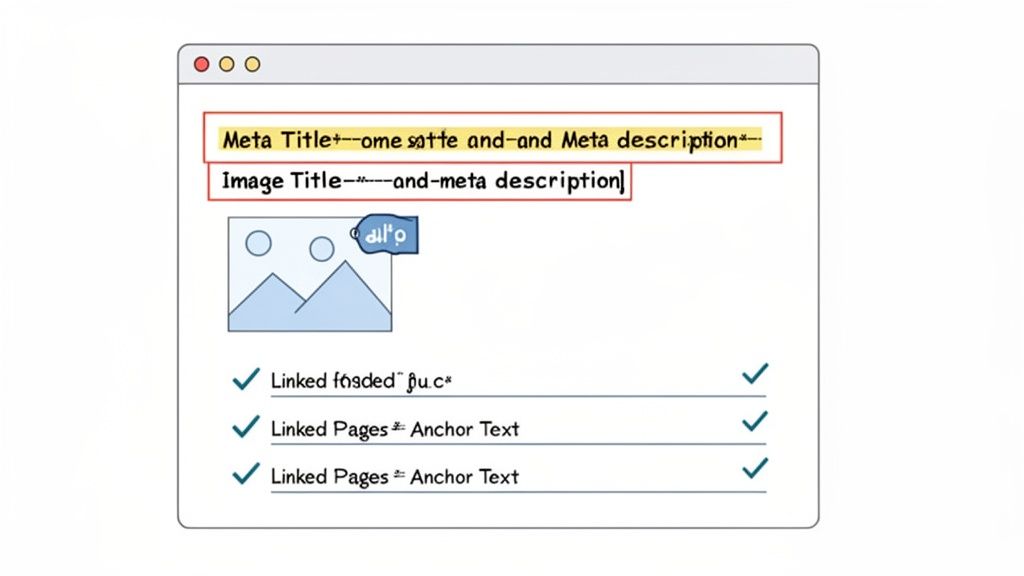
Nail Your Meta Titles and Descriptions
Your meta title and description are basically your article's billboard on the search results page. This is your one shot to grab a searcher's attention and earn their click. A great one can skyrocket your click-through rate (CTR).
While your H1 headline is for readers already on the page, the meta title is your pitch to potential readers on Google. You'll want to keep it under 60 characters so it doesn't get awkwardly cut off. Always include your primary keyword and a hook that promises value.
- Boring Meta Title: SEO Content Writing
- Optimized Meta Title: How to Write SEO Optimized Content That Ranks (2025 Guide)
The meta description, on the other hand, doesn't directly affect your rankings, but it absolutely influences clicks. You have about 155 characters to sell your article. Use your main keyword and write in an active voice that makes people want to click.
Your meta title and description are a one-two punch. The title grabs attention with a clear promise, while the description seals the deal by explaining exactly what the user will get out of clicking.
Optimize Your Images for Search and Accessibility
Images do more than just break up walls of text; they're SEO gold if you treat them right. Every single image you use needs three key things: a descriptive file name, a compressed file size, and good alt text.
First, before you even upload an image, change the file name to something descriptive. Instead of IMG_8432.jpg, rename it to something like seo-content-checklist.jpg. Use hyphens to separate the words.
Next, make sure your images aren't massive. Large files kill your page speed, and page speed is a ranking factor. A good rule of thumb is to keep them under 100KB.
Finally, always write descriptive alt text. This is non-negotiable. Alt text helps screen readers describe the image to visually impaired users, making your content accessible. It also gives search engines critical context about what the image shows.
- Bad Alt Text: "image"
- Good Alt Text: "A checklist graphic showing on-page SEO elements like meta titles and internal links."
Weave Your Content Together with Internal Links
Internal links are the connective tissue of your website. They guide users (and search engine crawlers) from one piece of content to another, spreading "link equity" or ranking power throughout your site. A smart internal linking strategy is one of the clearest signs of a seasoned SEO.
Your goal is twofold: link from your new article to other relevant, important pages on your site, and—this is the part many people forget—go back to your older, related articles and add links to your new piece. This helps Google find your new content faster and understand how it fits into your site's overall structure.
Here are a few tips to get it right:
- Use Descriptive Anchor Text: The clickable text of a link matters. Ditch generic phrases like "click here." Instead, use anchor text that tells both users and Google what the link is about, like "our complete guide to keyword research."
- Link Deep, Not Just Wide: Don't just link to your homepage. Find opportunities to link to specific, relevant blog posts and guides that offer more detail on a topic you’ve mentioned.
- Keep It Natural: Links should feel helpful, not spammy. Place them where a reader would genuinely want more information. As a general guideline, aim for 2-5 relevant internal links per post.
By getting these on-page details right, you're not just checking boxes. You're giving Google the clean, structured data it needs to rank your content and providing a much better experience for your readers.
Measuring Performance and Refreshing Content
Hitting "publish" isn't the finish line. It’s the starting line. Too many people treat content as a "set it and forget it" task, but that's a massive missed opportunity. An article is a living asset, and its real journey begins after it goes live.
Now, your job shifts from creator to analyst. You need to dig into the data to understand what's working, what isn't, and—most importantly—why. This is how you turn a decent article into a long-term, traffic-driving machine.
Monitoring Key Performance Indicators
So, how do you know if your content is actually doing its job? You have to track the right metrics. Your best friend here is Google Search Console, which gives you direct feedback on how your pages are performing in Google's search results.
Don't get lost in vanity metrics. Focus on these four core KPIs:
- Impressions: How many times your page showed up in search results. This tells you if you're even visible for your target keywords.
- Clicks: The number of people who actually clicked on your link. This, combined with impressions, gives you your click-through rate (CTR).
- Average Position: Your content's average ranking for various search queries. Is it climbing or slipping down the SERPs over time?
- Queries: The exact keywords people are using to find you. You'll almost always find some surprising, high-value keywords you weren't even targeting.
Think of these metrics as a regular health checkup for your content. A steady drop in impressions or a sliding average position are the early warning signs that an article is losing its relevance and needs a refresh.
Identifying Underperforming Content
Look, not every article is going to be a home run right out of the gate. That's totally fine. The real skill is spotting the ones with hidden potential that just need a little nudge.
A classic example is content with high impressions but a low CTR. This is a great sign! It means Google sees your content as relevant, but your title and meta description just aren't compelling enough to earn the click. A simple rewrite can work wonders here.
Another goldmine is content stuck on what I call "striking distance" pages—anything ranking between positions 8 and 15. These pages are so close to hitting the high-traffic spots on page one. A strategic refresh is often all it takes to push them over the edge.
Executing a Strategic Content Refresh
Once you've picked a piece of content to update, your goal isn't just to tweak it; you need to make it significantly better. A real content refresh is a strategic overhaul designed to pump up its value, relevance, and authority.
Here’s a simple framework I use to breathe new life into an aging post:
- Swap Outdated Info: Hunt down old stats, broken links, and mentions of outdated tools or processes. Replacing a 2022 statistic with a fresh 2025 data point is a quick win that immediately boosts your credibility.
- Add New, Deeper Insights: What have you learned since you first wrote the piece? Add new sections that reflect your current expertise or cover recent developments on the topic. This is a perfect way to beef up the experience and expertise signals for E-E-A-T.
- Optimize for New Keywords: Dive back into Google Search Console and look at the "Queries" report for that page. You’ll probably find it's getting impressions for keywords you never intended to target. Weave those terms and their variations into your headings and body copy to start capturing that traffic.
- Improve the User Experience: Is the article a wall of text? Break up long paragraphs. Add new images, create bulleted lists, or pull out key ideas into blockquotes to make it more scannable. A better user experience often leads to better engagement, sending all the right signals back to Google.
Common Questions About SEO Content Writing
Even with a solid workflow, you're bound to run into some practical questions when you’re in the trenches writing SEO content. Let's tackle a few of the most common ones I hear from writers.
How Long Should an SEO Optimized Article Be?
There’s no magic number. You'll see data suggesting that top-ranking pages often have over 1,400 words, but honestly, that's just a correlation. The real answer is much simpler: it should be as long as it needs to be.
Your goal isn't to hit a word count; it's to cover the topic more comprehensively than anyone else on page one. A straightforward informational query might be perfectly answered in 800 words. On the other hand, a complex "ultimate guide" could easily push past 4,000 words to be truly complete.
Forget the word count and focus on satisfying user intent. That's the only metric that matters.
Can I Use AI for All My SEO Content?
Going all-in on AI and letting it write everything without any human oversight is a risky move. AI tools are fantastic for speeding up research, spitting out initial outlines, and drafting sections to get you started. They’re a huge time-saver.
But the best content always comes from a human-AI partnership.
Use AI for the heavy lifting, but it’s your job to inject firsthand experience, unique insights, and your brand’s voice. This is absolutely critical for meeting Google's E-E-A-T standards and creating content that actually connects with people.
How Often Should I Update Old Blog Posts?
Great content isn't a "set it and forget it" asset. It needs regular maintenance to stay relevant. As a general rule of thumb, I recommend reviewing your most important articles every 6-12 months.
You can't update everything, so prioritize the posts that will give you the most bang for your buck. Focus on refreshing content that:
- Covers a fast-moving topic (like technology or marketing trends).
- Gets a lot of traffic but is starting to slowly slip in the rankings.
- Is stuck on page two and just needs a little push to get to page one.
A strategic content refresh can breathe new life into an old post, giving its relevance and rankings a serious boost. For more ideas on content strategy and creation, feel free to explore the other guides on the Pulsaro blog.